JD Edwards 9.2 Migration Guide: What to Expect and When to Plan It

Oussama Nait-Zlay
Content Marketing Manager
January 16, 2026
If JD Edwards has been running smoothly for years, it’s normal to hesitate before touching it. Many teams do. When an ERP does its job quietly, upgrades feel optional, sometimes even risky.
And yet, here we are, still talking about JD Edwards 9.2 migration in 2026.
That’s not because companies suddenly love upgrades. It’s because the conversation has shifted. Support timelines have tightened. Security expectations are higher. Integration projects are no longer side initiatives, they’re front and center. Slowly, the question changes from “Do we really need to upgrade?” to “What happens if we don’t?”
If you’re still running an older version of JD Edwards EnterpriseOne, you’re not alone. Far from it. Many organizations across manufacturing, distribution, and asset-heavy industries made the same call: keep the system stable, avoid disruption, and focus elsewhere. For a long time, that worked.
But stability has a shelf life.
This article is here to clarify what a JD Edwards 9.2 migration actually involves, why companies are still doing it years after its release, and how to think about it pragmatically.
If you’re early in the reflection phase, this will help you frame the discussion. If you’re already planning next steps, it should help you ask better questions.
TL;DR
-
Migrating to JD Edwards EnterpriseOne 9.2 allows organizations to remain on a version supported by Oracle.
-
It is an upgrade, not a full reimplementation.
-
The project covers applications, Tools Releases, infrastructure, customizations, and testing.
-
A well-planned migration reduces risk and makes future JD Edwards evolution easier.
-
Version 9.2 provides a stable foundation for upcoming modernization initiatives.
What Is JD Edwards EnterpriseOne 9.2?
Let’s clear up the most common confusion first.
JD Edwards EnterpriseOne 9.2 is the latest major version of JD Edwards.
And yes, it was released back in 2015.
That date often raises eyebrows. Understandably so.
Here’s the thing. Oracle made a deliberate shift with JD Edwards. Instead of releasing new major versions every few years, they anchored the product on one long-term release, EnterpriseOne 9.2, and committed to enhancing it continuously.
So while the version number stayed the same, the platform didn’t stand still.
Since its release, 9.2 has received:
-
Regular Tools Releases that update the technical foundation
-
Application updates that improve functional areas
-
Ongoing security patches and compliance support
In practical terms, 9.2 today is not the same 9.2 that shipped in 2015. It’s more like a house that’s been renovated over time. Same structure. Better plumbing. Smarter wiring.
It’s also important to say this clearly: there is no JD Edwards 9.3 planned. Oracle has been consistent on that point. EnterpriseOne 9.2 is the reference version going forward, which is why support policies, integrations, and modernization initiatives increasingly assume you’re on it.
If you want a broader refresher on how JD Edwards fits into Oracle’s ERP landscape, this overview of what JD Edwards is can help set the stage.
From here, the real question becomes less about the version number, and more about what moving to 9.2 actually means for your system, your customizations, and your teams.
That’s where migrations get interesting.
What Does a JD Edwards 9.2 Migration Actually Involve?
This is usually where the word migration starts to feel heavy.
Because a JD Edwards 9.2 migration isn’t just a technical update you run over a weekend. It’s a structured upgrade that touches several layers of the system, some visible, some less so.
At a high level, most 9.2 migrations include a combination of the following.
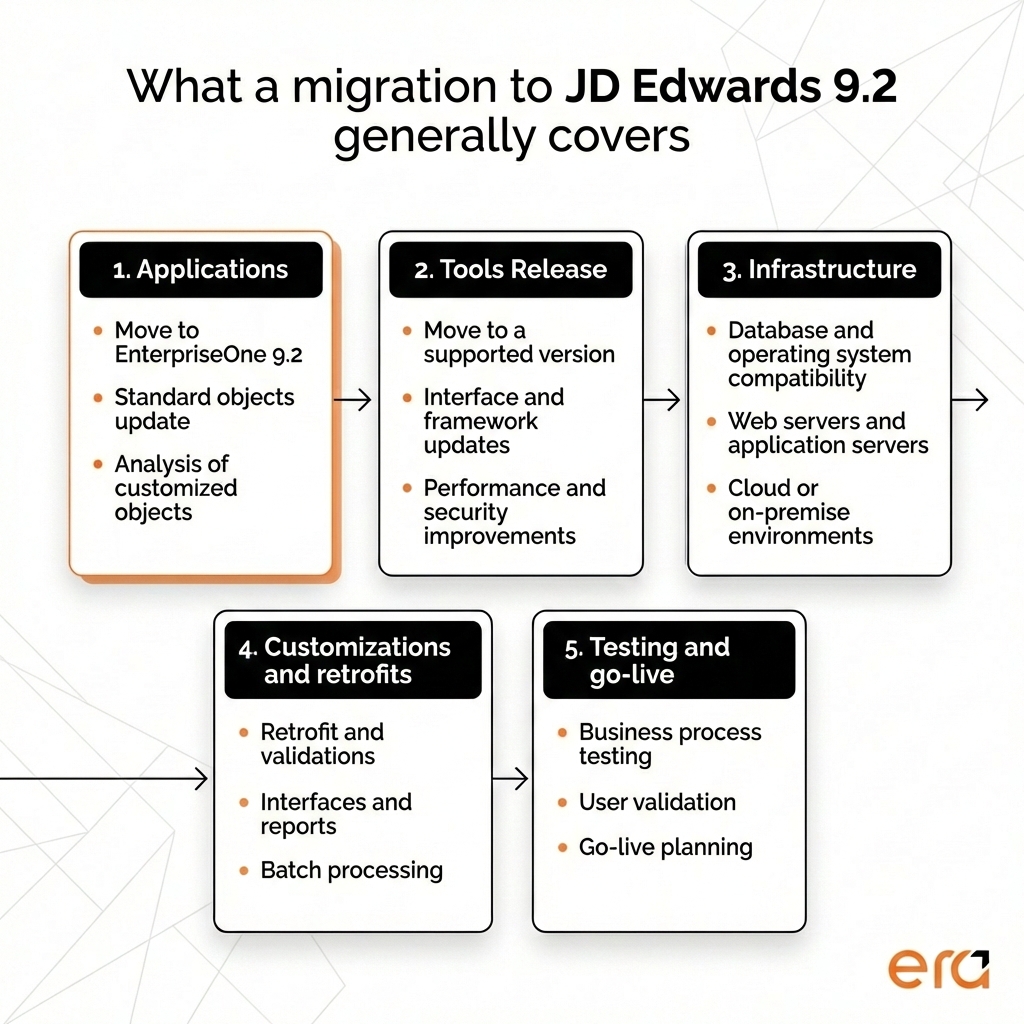
First, there’s the application upgrade. This is the move from your current EnterpriseOne release, often 9.0 or 9.1, to the 9.2 application code line. Standard objects are updated, and custom ones need to be reviewed, retrofitted, or sometimes rewritten. This step alone tends to surface a lot of “we forgot this existed” moments.
Then comes the Tools Release upgrade. This part is often underestimated. Tools control how JD Edwards runs, how users interact with it, how integrations behave, and how performance is handled. Moving to a supported Tools Release is not optional when upgrading to 9.2, and it’s also where many of the technical improvements live.
Infrastructure is the next piece. A 9.2 migration usually goes hand in hand with:
-
Database updates
-
Operating system changes
-
Web and application server adjustments
-
Sometimes a move to newer environments or cloud-hosted setups
Even if your infrastructure looks fine on paper, compatibility matters. What worked ten years ago does not always play nicely with newer stacks.
Customizations deserve their own paragraph, because they’re often the biggest source of anxiety. Reports, business functions, interfaces, batch jobs, custom tables. None of them automatically break, but none of them can be ignored either. Each one needs to be assessed, adjusted if needed, and tested in context. This is where experience really shows.
And then there’s testing. Not just technical validation, but business testing. Real scenarios. Real data. Month-end processes. Edge cases no one remembers until they fail. This phase takes time, and it should. Rushing it usually costs more later.
Finally, there’s the cutover. Planning downtime, sequencing steps, coordinating teams, and making sure users aren’t left guessing on Monday morning. A calm cutover is rarely accidental.
Here’s the part that often surprises people. A JD Edwards 9.2 migration doesn’t have to change how your users work right away. Many companies deliberately keep processes stable during the upgrade. They migrate first, then improve later.
And that’s not a compromise. It’s often a smart call.
Which naturally leads to the next question. If 9.2 has been around for so long, why are so many organizations still doing this now?
Why Companies Are Still Migrating to JD Edwards 9.2 Today
At first glance, it might seem late to talk about a migration to a version released years ago. But when you look closer, the timing makes sense.
Most JD Edwards customers didn’t rush to 9.2 when it came out. They waited. Not because they were behind, but because their systems were doing what they were supposed to do. Orders were flowing, financials were closing, warehouses were shipping. Stability has a way of quieting urgency.
Over time, though, a few pressures start to surface.
Support is usually the first one. Older EnterpriseOne versions sit under extended or limited support, which means fewer fixes, slower responses, and higher risk exposure. That’s manageable for a while. It becomes harder to justify once audits, insurance reviews, or internal risk teams get involved.
Security follows closely. Expectations around data protection, access control, and patching have changed. What was acceptable years ago often no longer is, especially for organizations operating across multiple sites or regions. Staying current on 9.2 simplifies that conversation.
Then there’s integration. This is a big one. Projects that once lived on the side now sit at the core of IT roadmaps. E-commerce platforms, CRM systems, warehouse solutions, reporting tools. They all expect cleaner interfaces, modern protocols, and predictable behavior. EnterpriseOne 9.2 supports that far better than older releases, especially when tools like Orchestrator come into play.
Infrastructure refresh cycles also act as quiet triggers. When servers age out or a cloud strategy takes shape, teams are forced to ask uncomfortable questions. Should we rebuild an old JD Edwards version on new infrastructure, or take the opportunity to move forward?
And sometimes, it’s simply momentum. A new CIO arrives. A modernization initiative gets approved. A long-postponed project finally reaches the top of the list.
What’s worth noting is that most of these migrations are not emergency reactions. They’re calculated moves to reduce future friction. Companies migrate to 9.2 not because they want change for its own sake, but because staying where they are starts to feel heavier than moving.
Which brings us to a subtle but important distinction. Migrating to 9.2 is not the same thing as modernizing JD Edwards.
Migration vs Modernization: Not the Same Thing
Migration and modernization are often used in the same sentence, sometimes even interchangeably. That’s understandable. They’re related. But they’re not the same thing, and treating them as one big initiative is where many projects start to feel overwhelming.
A JD Edwards 9.2 migration is about getting to a supported, stable foundation. It focuses on keeping the system running, reducing risk, and making sure you’re on a version Oracle actively maintains.
JD Edwards Modernization, on the other hand, is about what you do once that foundation is solid.
This is where things like:
-
Orchestrator
-
Automation
-
Better user experiences
-
Smarter integrations
start to enter the picture.
Some organizations choose to bundle everything together. Migration plus modernization in one large program. That can work, especially if timelines and budgets allow for it. But many companies take a different path. They migrate first, stabilize, and then modernize in phases. That approach often feels calmer. More controlled.
There’s also a misconception worth clearing up. Moving to 9.2 does not force you to change how people work on day one. Screens don’t suddenly look unfamiliar. Processes don’t need to be rewritten overnight. You can keep things intentionally boring during the migration, then introduce improvements when teams are ready.
In fact, many modernization initiatives simply aren’t feasible on older versions. Tools like Orchestrator, advanced integrations, and AI-driven enhancements assume you’re on 9.2. Migration becomes the prerequisite, not the end goal.
If you’re exploring what modernization can look like in practice, these perspectives might be useful:
-
5 Reasons to Modernize JD Edwards with Artificial Intelligence
-
What If Your JD Edwards Could Do More Thanks to Connected Applications?
-
How JD Edwards and Orchestrator Simplify E-Commerce Integration
Once this distinction is clear, another question naturally comes up. If migration is mostly about stability, is it something internal teams can handle on their own?
Thinking beyond the upgrade?
Migrating to JD Edwards 9.2 is often the first step. Our modernization guide explores what teams typically build on top of that foundation, from integrations to automation.
Get the GuideCan You Upgrade to JD Edwards 9.2 Without a Partner?
The honest answer is… sometimes.
From a purely technical standpoint, companies can upgrade to JD Edwards 9.2 using their internal teams. Oracle provides documentation. Internal CNC teams (JD Edwards technical teams) know the system. Nothing is hidden behind a curtain.
So yes, it’s possible.
But here’s the part that usually gets glossed over. Possible doesn’t always mean sensible.
Most internal JD Edwards teams are built for stability. Day-to-day operations. Support tickets. Month-end closes. Keeping the lights on. An upgrade, especially one to 9.2, is a different type of work. It’s temporary, intensive, and full of edge cases that don’t show up in normal operations.
That’s why many organizations end up choosing a hybrid approach.
Internal teams often stay closely involved. They validate business processes, support testing, and provide critical system knowledge. Oracle Partners, like Era Consulting Group, step in to handle the heavier technical lift. Tools Releases, application retrofits, environment setup, and cutover planning. The parts where decades of experience with past upgrades really pays off.
There’s also a timing reality. Upgrades don’t happen every year. Most internal teams haven’t done one in a long time. A partner like Era Consulting Group, on the other hand, do them repeatedly. They recognize patterns quickly. They know where things usually break. They plan around those risks instead of discovering them late.
This is about reducing exposure and not outsourcing responsibility.
One more thing that often influences the decision is accountability. When an upgrade is handled entirely in-house, pressure stays internal when something slips. With a partner, there’s shared responsibility, clearer timelines, and often a calmer escalation path when issues surface.
For many companies, the goal isn’t to hand everything over. It’s to move through the migration efficiently, with fewer surprises, and come out with a system that feels familiar, stable, and ready for what comes next.
And that brings us to another important topic. The assumptions people make about 9.2 migrations. Some of them are surprisingly persistent.
Common Risks and Misconceptions About JD Edwards 9.2 Migrations
Ask ten JD Edwards teams what worries them about a 9.2 migration, and you’ll hear the same concerns repeated. Not because they’re careless, but because these ideas have been circulating for years.
Let’s unpack a few of them.
-
“9.2 is old, so why bother?”
This one comes up a lot. Yes, 9.2 was released in 2015. But it’s not frozen in time. Oracle has continued to update it through Tools Releases and application updates. In practice, a well-maintained 9.2 environment is far more current, and far more secure, than an older version that hasn’t moved in years. The version number can be misleading.
-
“Our customizations will break.”
Some will need adjustment. That’s true. But break is a strong word. Most custom objects behave predictably once reviewed and retrofitted properly. The real risk isn’t customization itself. It’s not knowing what you have, or discovering it too late in the process. With proper analysis upfront, surprises tend to shrink quickly.
-
“Downtime will be massive.”
It doesn’t have to be. Downtime depends on preparation, testing, and cutover planning. Many organizations plan migrations around narrow windows, sometimes over a weekend, sometimes in stages. The calmer the preparation, the calmer the go-live tends to be. Chaos is rarely a technical issue. It’s usually a planning one.
-
“We need to modernize everything at the same time.”
This is where projects start to feel overwhelming. Migration and modernization can happen together, but they don’t have to. Many teams deliberately keep the migration focused and conservative, then layer improvements afterward. That choice often reduces risk and internal resistance.
There’s also a quieter misconception worth mentioning. Some teams assume that staying on an older version is the safer option. In reality, risk shifts over time. Unsupported software, aging infrastructure, and shrinking internal expertise introduce their own kind of fragility. It’s slower, less visible, but it’s still there.
Once these myths are addressed, the conversation usually becomes more constructive. Instead of asking “What could go wrong?”, teams start asking “What does this enable?”
And one of the clearest answers to that question is integration.
How JD Edwards 9.2 Supports Integration and Connected Applications
While integration pressure exists regardless of version, the experience of integrating JD Edwards changes noticeably once you’re on EnterpriseOne 9.2.
On older releases, integrations often rely on rigid interfaces, batch-driven processes, or tightly coupled custom code. They usually work, but they can be fragile. A small change in one system can ripple outward, and troubleshooting tends to take longer than it should. Over time, teams spend more energy maintaining connections than improving them.
EnterpriseOne 9.2 introduces a more structured way to expose data and business processes. This is where Orchestrator becomes especially relevant. Instead of hardwiring logic into the core ERP, teams can trigger actions, exchange data with external systems, and automate workflows in a controlled, reusable way.
What changes in practice is the mindset. Integration stops being a series of one-off projects and starts to feel more like a layer that can evolve. Orchestrations can be reused across applications. Events can trigger actions in near real time. Adjustments can often be made without reopening core customizations.
This approach works particularly well for organizations connecting JD Edwards to e-commerce platforms, artificial intelligence, customer portals, reporting tools, or custom-built applications designed to support specific operational needs. JD Edwards remains the system of record, but it becomes easier to extend without destabilizing what already works.
This is often the moment when migration shifts from a technical necessity to a strategic enabler. Once integrations feel easier to manage, teams gain room to experiment, automate, and improve without putting core operations at risk.
When Is the Right Time to Migrate to JD Edwards 9.2?
There’s no universal calendar date that makes a JD Edwards 9.2 migration suddenly urgent. For most organizations, the decision builds gradually, shaped by context rather than crisis.
That said, there are a few signals that tend to show up again and again.
One common trigger is support pressure. When your current version moves deeper into extended or limited support, conversations change. Questions from auditors get more pointed. Security reviews take longer. What once felt acceptable starts to feel exposed. Migration becomes less about improvement and more about reducing risk.
Another signal appears when new projects collide with old foundations. Integration initiatives, reporting upgrades, customer portals, and technology expansions. These projects often assume capabilities that older JD Edwards versions struggle to support cleanly. Teams can work around it for a while, but eventually the workarounds pile up.
Infrastructure refresh cycles also play a role. When hardware reaches end of life or a cloud strategy takes shape, rebuilding an aging JD Edwards version starts to feel like a missed opportunity. Many organizations decide it makes more sense to modernize the foundation while they’re already making changes.
There’s also the human factor. Internal JD Edwards expertise tends to concentrate in a small group. As roles shift and people move on, maintaining older environments can become harder. Migrating to 9.2 simplifies long-term support and makes it easier to onboard new team members.
And sometimes, the timing is simply strategic. A new IT roadmap. A leadership change. A broader modernization initiative that finally creates space for long-postponed work.
What’s important to remember is this. The right time is rarely “when everything breaks.” It’s usually earlier than that. When the system is stable enough to migrate calmly, test thoroughly, and plan the cutover without pressure.
Once that timing feels clearer, the next question becomes practical rather than theoretical.
How should a migration like this actually be approached? That’s where experience makes a real difference.

Want to see how other JD Edwards teams approach modernization?
This on-demand webinar explores how organizations extend JD Edwards, with practical examples and lessons learned.
Watch the On-Demand WebinarHow Era Consulting Group Approaches JD Edwards 9.2 Migrations
By the time organizations seriously consider a JD Edwards 9.2 migration, they’re usually past the theory stage. They know why it matters. What they’re looking for now is reassurance. A sense that the project can be handled methodically, without unnecessary disruption.
At Era Consulting Group, the approach is intentionally pragmatic.
The starting point is always understanding the current environment. Not just the version number, but the reality behind it. Customizations, integrations, infrastructure constraints, internal capabilities. Every JD Edwards environment has its own history, and migrations tend to go more smoothly when that history is respected rather than ignored.
From there, migrations are structured to reduce risk. That usually means separating what’s essential from what can wait. Core upgrade activities first. Stabilization next. Improvements layered in when teams are ready. This keeps scope under control and avoids turning the migration into a moving target.
Era teams work closely with internal IT and business users throughout the process. Internal teams bring critical system knowledge and business context. Era Consulting Group brings repeatable migration experience, tooling, and a clear view of where issues typically surface. The goal is not to take control away, but to share responsibility and shorten the learning curve.
Most importantly, migrations are treated as foundations, not finish lines. A successful move to 9.2 leaves the system stable, supported, and ready to evolve, whether that means deeper integrations, automation, or longer-term modernization initiatives.
Migration as a Foundation, Not a Finish Line
A JD Edwards 9.2 migration is about staying supported, reducing long-term risk, and keeping options open.
Many organizations delayed the move for good reasons. Stability mattered. Other priorities took precedence. JD Edwards allowed that flexibility. But over time, staying put starts to carry its own cost, even if it’s not immediately visible.
Migrating to 9.2 creates breathing room. It gives teams a stable base to integrate, automate, and improve at a pace that fits their reality. Not everything has to change at once. In fact, it rarely should.
When approached thoughtfully, a 9.2 migration is a reset. A chance to put the system back on solid ground and move forward with fewer constraints.
And for many JD Edwards teams, that’s exactly what they’re looking for.

Want to talk through your JD Edwards 9.2 migration?
Every JD Edwards environment is different. If you’re weighing a move to 9.2 and want to talk through timing, scope, or risks specific to your setup, a short conversation can help clarify next steps.
Talk to a JD Edwards ExpertFAQ
Is JD Edwards EnterpriseOne 9.2 still supported by Oracle?
Yes. JD Edwards EnterpriseOne 9.2 is Oracle’s long-term, supported release. Oracle continues to deliver updates through Tools Releases, application enhancements, and security patches, rather than introducing new major versions. Staying on 9.2 keeps your environment within Oracle’s active support framework.
Is migrating to JD Edwards 9.2 the same as a full reimplementation?
No. A migration to 9.2 is an upgrade of your existing JD Edwards environment, not a replacement. Core processes, data, and configurations are typically preserved. The focus is on moving to a supported version while keeping business disruption to a minimum.
How long does a JD Edwards 9.2 migration usually take?
Timelines vary depending on system complexity, customizations, integrations, and testing scope. For many organizations, a migration can take several months from initial assessment to go-live. Planning and testing phases often matter more than the technical upgrade itself.
Can we keep our current processes after migrating to 9.2?
Yes. Many organizations choose to keep processes unchanged during the migration. JD Edwards 9.2 does not force immediate functional or user experience changes. Process improvements and modernization initiatives can be introduced gradually after the upgrade.
Do we need to modernize JD Edwards at the same time as migrating to 9.2?
Not necessarily. Migration and modernization are related but separate initiatives. Some teams combine them, while others migrate first and modernize later. Moving to 9.2 creates a stable foundation that makes future modernization easier, but it doesn’t require doing everything at once.
Can a JD Edwards 9.2 migration be handled internally?
In some cases, yes. Organizations with experienced internal JD Edwards teams may handle parts of the migration themselves. However, many choose a hybrid approach, where internal teams provide system knowledge and partners support the technical upgrade and risk management aspects.
Oussama Nait-Zlay
Content Marketing Manager
Oussama is a technology content expert at Era Consulting Group. He focuses on making complex topics related to ERP and enterprise technologies accessible, helping organizations fully leverage digital innovations. He brings several years of experience in the SaaS and technology industries, notably with companies such as Zoho and ManageEngine.
Follow Oussama Nait-Zlay
Featured