
What Is JD Edwards Orchestrator?

Oussama Nait-Zlay
Content Marketing Manager
February 17, 2026
If you work with JD Edwards, chances are you’ve heard the word Orchestrator more than once. It pops up in conversations about automation. It comes up when integrations are discussed. Sometimes it’s mentioned during upgrades, sometimes during demos. And often, it’s followed by a small pause.
Because while the name sounds important, what it actually does isn’t always clear.
For some teams, Orchestrator feels like one of those features that exists somewhere in the background. You know it’s there. You know it’s supposed to help. But when someone asks, “What do we really use it for?”, the answer tends to get vague. A bit technical. Or quickly redirected to another topic.
That confusion is understandable. JD Edwards has a long history, and many organizations are still using it in ways that were designed years ago. Solid ways. Proven ways. So when something new enters the picture, especially something tied to automation or integration, it can feel abstract at first.
Here’s the thing though. Orchestrator isn’t abstract. It’s not concept layered on top of JD Edwards. It was introduced to solve very real, very practical problems that JDE users face every day. The problem is not that Orchestrator is complex; it’s that it’s rarely explained in simple terms.
And that’s exactly what this article is here to do.
Before talking about modernization strategies or advanced scenarios, it makes sense to slow down for a moment and answer a basic question. A useful one.
What is JD Edwards Orchestrator, really?
TL;DR
-
JD Edwards Orchestrator is a core component of JD Edwards EnterpriseOne 9.2 that enables event-based automation without changing the ERP core.
-
It exposes existing JD Edwards business logic as services, helping reduce manual steps and processing delays.
-
Orchestrator does not replace JD Edwards or bypass its business rules; it builds on what already exists.
-
It is commonly used for automation, alerts, integrations, and real-time interactions with other systems.
-
Understanding Orchestrator is often the first practical step toward evolving JD Edwards without starting from scratch.
So… what exactly is JD Edwards Orchestrator?
At its core, JD Edwards Orchestrator is a way to make JD Edwards easier to interact with. Not just for IT teams, but for the entire ecosystem that now surrounds an ERP.
Traditionally, JD Edwards was very good at running structured business processes. Orders, invoices, inventory, financials. Everything followed a defined path, often triggered by a user action or a batch job. That model still works. But it can feel rigid when you want JD Edwards to react faster or talk more naturally with other systems.
This is where Orchestrator comes in.
Orchestrator allows JD Edwards business logic to be exposed as services. In plain terms, it means actions inside JDE can be triggered automatically, without a user clicking through screens or launching custom programs. A process can start because something happened, not because someone remembered to run it.
Think of Orchestrator as a control layer that sits on top of JD Edwards. It doesn’t replace existing processes. It doesn’t rewrite your applications. Instead, it coordinates what already exists and makes it accessible in a more flexible way.
Orchestrator is a core component of JD Edwards EnterpriseOne 9.2 and was introduced as part of Oracle’s effort to make the platform more responsive and easier to integrate with other systems.
Here’s an analogy that often helps. If JD Edwards is the engine of a car, Orchestrator is the set of sensors and switches that let that engine respond to the environment. The engine stays the same. You just get smarter reactions.
From a technical perspective, Orchestrator relies on orchestrations, which are sequences of steps tied to JD Edwards functions. But you don’t need to be a developer to grasp the value. What matters is that these orchestrations can be triggered automatically and can interact with other tools outside JDE.
And that changes the conversation.
Oracle also provides tools like the Process Recorder, which can capture user actions in JD Edwards and help turn them into orchestrations, reducing the need for custom development.
Suddenly, JD Edwards is no longer a system that waits for instructions. It becomes a system that can respond, connect, and act in real time. That’s a big shift, even if it happens quietly in the background.
Now, the obvious follow-up question is: why did Oracle feel the need to add this layer in the first place?
That’s where the story really starts to make sense.
Why Oracle introduced Orchestrator in JD Edwards
JD Edwards has always been built for stability. That’s one of the reasons it’s still trusted by so many organizations. Processes are predictable. Data is controlled. Changes are deliberate. For years, that was exactly what businesses needed.
But expectations changed.
Not overnight, and not in a dramatic way. More like a slow shift. Teams started asking for quicker responses. Managers wanted data without waiting for overnight jobs. Other systems, like CRM platforms or reporting tools, needed to exchange information with JDE more often. And the old ways of doing this, custom programs, batch processes, manual steps, started to show their limits.
Oracle saw this pattern across its JD Edwards customer base.
Every new requirement seemed to lead to more custom code. More maintenance. More dependency on a small group of experts who knew how everything was wired together. That approach worked, until it didn’t. It made systems harder to adapt and slower to evolve.
Orchestrator was introduced to change that dynamic.
Instead of modifying core applications each time a new need appeared, Oracle provided a framework that could reuse existing JD Edwards logic and make it callable, triggerable, and easier to connect. The goal was not to turn JD Edwards into something else, but to help it behave more naturally in an environment where systems are expected to communicate and react.
There’s a small contradiction here that’s worth mentioning. Orchestrator was designed to simplify things, yet at first glance it can look like just another layer. That reaction is normal. But once you understand the intent, it becomes clear that the layer exists to reduce complexity over time, not add to it.
In other words, Oracle wasn’t solving a technical problem alone. It was addressing a structural one. How do you let JD Edwards evolve without constantly touching what already works?
Orchestrator is Oracle’s answer to that question.
And once you understand why it exists, it becomes easier to see what it actually does on a day-to-day basis.
That’s the next piece of the puzzle.
What Orchestrator actually does
Once you strip away the labels and the technical language, Orchestrator does something fairly straightforward. It lets JD Edwards react.
React to an event.
React to a condition.
React without waiting for someone to step in.
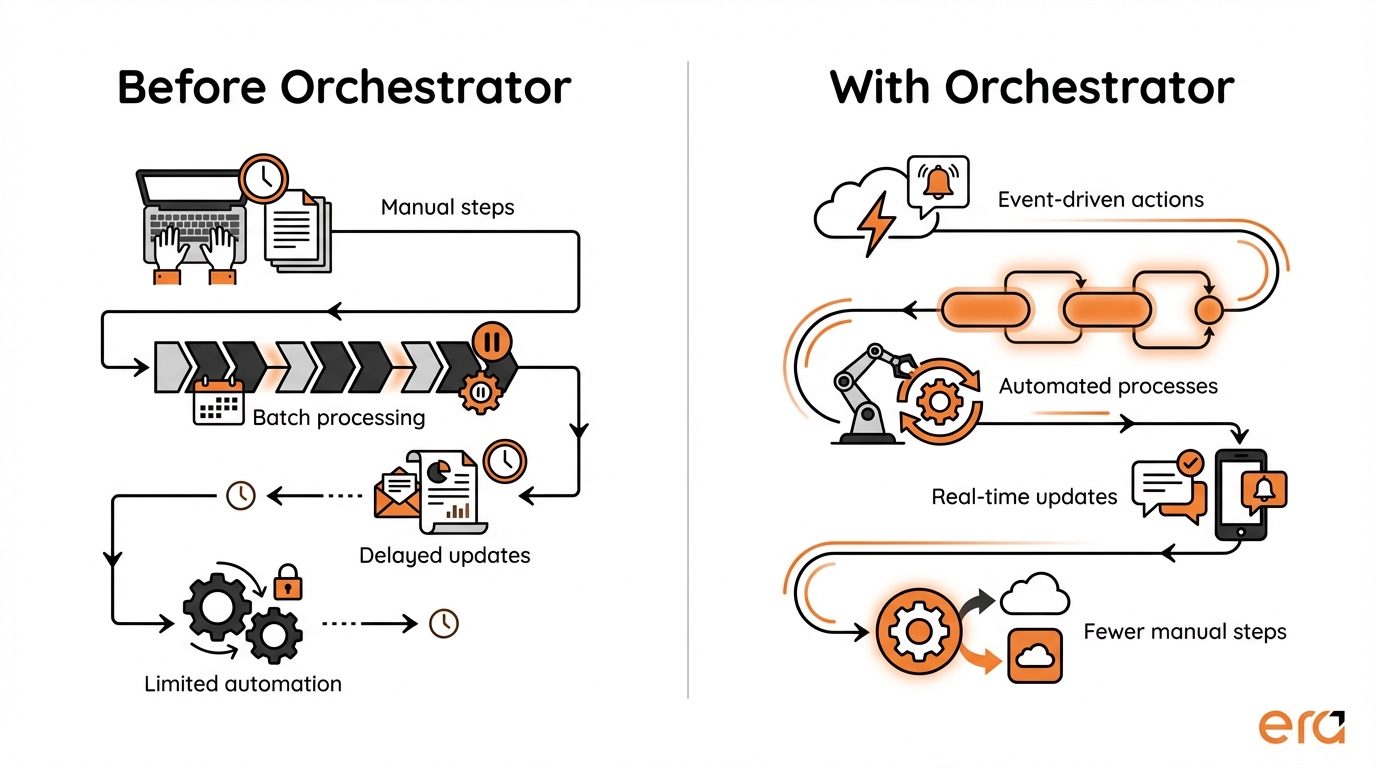
Before Orchestrator, many actions inside JD Edwards were tied to very specific moments. A user clicks a button. A batch job runs overnight. A report is generated at a fixed time. That rhythm still exists, and it’s not wrong. But it doesn’t always match how businesses operate anymore.
With Orchestrator, actions can be triggered when something happens, not just when something is scheduled.
For example, when an order reaches a certain status, Orchestrator can automatically send that information to another system. When a threshold is exceeded, it can trigger an alert. When data is updated, it can be made available immediately to a reporting tool. No extra screens. No manual exports. No waiting until tomorrow morning.
Another important point is that Orchestrator doesn’t invent new business logic. It uses what’s already there. The same rules, validations, and processes that live inside JD Edwards are reused. Orchestrator simply gives them a different way to be activated and shared.
You can think of it as opening controlled doors inside JDE. The logic stays protected. The system stays stable. But selected processes are now accessible to the outside world, or can run automatically when conditions are met.
This is also why Orchestrator fits so naturally with modern tools. Analytics platforms, low-code apps, or external portals don’t need to “understand” JD Edwards in depth. They just need a reliable way to trigger actions or receive data. Orchestrator acts as that intermediary, quietly doing the heavy lifting behind the scenes.
The result is not a radical change in how JD Edwards works day to day. It’s more subtle than that. Processes feel smoother. Fewer manual steps creep in. Data moves when it’s needed, not when it’s convenient for the system.
And once you see it in action, the question usually shifts from “What does Orchestrator do?” to something much more practical.
Where would this actually help us?
That’s where real-world use cases come in.
Common use cases that make Orchestrator click
For many JD Edwards users, Orchestrator only really makes sense once they see it applied to situations they recognize. Not theoretical scenarios. Real, everyday ones.
A common starting point is automation around routine events. Take order management, for example. When an order changes status, several teams often need to know. Sales wants visibility. Operations wants to prepare. Sometimes an external system needs that update too. Without Orchestrator, this can mean manual checks or delayed batch updates. With Orchestrator, that status change can trigger an automatic action the moment it happens.
Another frequent use case is data sharing with reporting or analytics tools. JD Edwards holds valuable information, but extracting it at the right time can be tricky. Orchestrator allows specific data to be exposed when needed, without waiting for scheduled jobs. This makes dashboards more relevant and decisions more timely, especially for operational teams who rely on current data rather than yesterday’s numbers.
Integrations with external platforms are also a natural fit. Whether it’s an eCommerce site, a customer-facing portal, artificial intelligence or some applications, these systems often need to interact with JD Edwards in near real time. Orchestrator makes it possible to trigger JDE processes from outside the ERP, while still respecting its business rules. The external system asks. JD Edwards responds. Cleanly.
There are also quieter use cases that don’t get much attention but make a real difference. Automated alerts when thresholds are exceeded. Notifications when exceptions occur. Small actions that remove the need for someone to constantly monitor screens or reports. These don’t sound dramatic, but they add up quickly.
What’s interesting is that these scenarios rarely require a full redesign of processes. In most cases, the underlying JD Edwards logic already exists. Orchestrator simply connects the dots and removes friction.
And this is often the moment when teams realize something important. Orchestrator is about doing things at the right moment, with less effort.
Of course, this clarity also raises another question. If Orchestrator can do all this, what isn’t it meant to do?
That distinction matters more than it seems.
What JD Edwards Orchestrator is not (and why that matters)
Once people start to grasp what Orchestrator can do, it’s easy for expectations to grow a bit too fast. That’s normal. Automation has that effect. But this is exactly where it helps to be clear about boundaries.
First, Orchestrator is not a replacement for JD Edwards. It doesn’t take over core ERP functions, and it doesn’t bypass existing business rules. Everything still runs through JD Edwards. Orchestrator simply decides when and how certain actions are triggered.
It’s also not a full integration platform on its own. While it can connect JD Edwards to other systems, it’s not designed to manage complex integration landscapes by itself. In many environments, it works alongside other tools that handle data transformation, orchestration between multiple systems, or long-running workflows. Orchestrator focuses on JD Edwards. That focus is intentional.
Another common misunderstanding is to see Orchestrator as a way to avoid process thinking. It doesn’t magically fix inefficient workflows. If a process is unclear or poorly designed, automating it won’t make it better. In fact, it often highlights where things need to be clarified first. That might sound like a limitation, but it’s actually a strength.
Why does all this matter? Because understanding what Orchestrator is not helps teams use it correctly. It prevents disappointment. It keeps projects realistic. And it ensures Orchestrator is used where it adds real value, rather than being stretched into roles it was never meant to play.
When expectations are set properly, Orchestrator becomes a reliable tool instead of an overhyped one. And that’s usually when organizations start seeing consistent results.
So where does that leave Orchestrator inside a typical JD Edwards setup?
It fits in more naturally than you might expect.
Where Orchestrator fits in a JD Edwards environment
By the time teams understand what Orchestrator does and what it doesn’t, its place in the JD Edwards landscape becomes clearer. It’s not something that sits on the side, and it’s not something that takes over. It lives right where it’s most useful.
Orchestrator sits between JD Edwards and everything that needs to interact with it. Internal tools. External platforms. Reporting layers. It acts as a controlled access point, allowing selected processes and data to move in and out without exposing the entire system.
In practice, this means JD Edwards can remain the system of record, doing what it has always done well, while Orchestrator handles the moments where responsiveness and connectivity matter. The core stays stable. The edges become more flexible.
What’s interesting is that Orchestrator often becomes a starting point rather than a final destination. Organizations rarely roll it out everywhere at once. They begin with one or two processes that clearly need automation or real-time interaction. From there, usage grows organically, based on real needs rather than big design exercises.
This gradual adoption is part of why Orchestrator fits so well in long-standing JD Edwards environments. It doesn’t force change. It supports it, one use case at a time.
And this is where Orchestrator quietly supports broader initiatives without trying to lead them. Whether the goal is better reporting, smoother integrations, or simply fewer manual steps, Orchestrator provides a practical way to move forward without rewriting what already works.
Which brings us to the bigger picture.

Modernizing JD Edwards Without Starting From Scratch
JD Edwards modernization doesn’t have to mean replacing what already works. This guide explores practical ways to evolve your ERP step by step, using tools like Orchestrator while preserving the stability and value of your existing system.
Download the modernization guideA simple way to think about Orchestrator going forward
JD Edwards Orchestrator doesn’t exist to make JD Edwards feel new. It exists to make it more responsive.
That distinction matters.
Orchestrator is about giving JD Edwards the ability to react, connect, and participate in a more connected application landscape. Quietly. Reliably.
For teams exploring how their ERP can evolve over time, understanding Orchestrator is often the first real step. Not because it answers every question, but because it reframes what’s possible without forcing a reset.
Once that clarity is there, decisions become easier. What to automate. What to integrate. What can wait.
And in many cases, that’s exactly what JD Edwards users are looking for. Not a radical shift. Just a smarter way forward.

See Orchestrator in action
Understanding Orchestrator is one thing. Seeing how it supports real JD Edwards modernization scenarios is another. This on-demand webinar explores how organizations use Orchestrator alongside integrated solutions to evolve their ERP.
Watch the webinarFAQ
Is JD Edwards Orchestrator included with JD Edwards?
Yes. Orchestrator is part of the JD Edwards ecosystem provided by Oracle. It’s not a third-party add-on. That said, using it effectively still requires the right setup, configuration, and understanding of how it fits into your environment.
Do you need to be a developer to use Orchestrator?
Not necessarily. While technical knowledge helps, Orchestrator was designed to reduce reliance on heavy custom development. Many use cases can be handled by functional or technical analysts who understand JD Edwards processes, especially when Orchestrator is used alongside low-code tools.
Can Orchestrator replace custom programs in JD Edwards?
In some cases, yes. Orchestrator can reduce the need for certain custom programs, especially those created only to trigger actions, move data, or automate repetitive steps. However, it’s not meant to eliminate all customizations. It works best when used selectively and thoughtfully.
Is Orchestrator only useful for integrations?
No. Integrations are a common use case, but they’re not the only one. Orchestrator is also used for process automation, event-driven actions, alerts, and exposing JD Edwards logic to other internal tools. Its value goes beyond system-to-system connections.
Is Orchestrator a modernization project on its own?
Not really. Orchestrator is better seen as an enabler rather than a standalone initiative. It supports modernization efforts, but it doesn’t define the strategy by itself. Most organizations introduce it gradually, starting with specific, high-value use cases.
When is the right time to consider using Orchestrator?
Usually when manual steps, delays, or integration challenges start to slow things down. If teams are exporting data manually, relying on batch jobs for time-sensitive information, or struggling to connect JD Edwards to other systems, Orchestrator often becomes relevant.
How does Orchestrator impact JD Edwards performance or stability?
When implemented correctly, Orchestrator does not compromise the stability of JD Edwards. It relies on existing business logic and respects system controls. Like any tool, it needs proper governance, but it was designed with enterprise stability in mind.

Have questions about Orchestrator in your JD Edwards environment?
Every JD Edwards environment is different. If you’d like to discuss how Orchestrator could apply to your specific processes, integrations, or constraints, our JD Edwards specialists can help you explore the right approach.
Talk to a JD Edwards expert
Oussama Nait-Zlay
Content Marketing Manager
Oussama is a technology content expert at Era Consulting Group. He focuses on making complex topics related to ERP and enterprise technologies accessible, helping organizations fully leverage digital innovations. He brings several years of experience in the SaaS and technology industries, notably with companies such as Zoho and ManageEngine.
Follow Oussama Nait-Zlay
Featured