Managing Manufacturing Projects and Costs in Microsoft Dynamics 365 Business Central

Oussama Nait-Zlay
Content Marketing Manager
March 30, 2026
In many manufacturing companies, project management still feels like a puzzle. Some information lives in the ERP, a few spreadsheets are shared across teams, and sometimes a separate task management tool is added on top. The result? Financial data comes in late, and project profitability stays fuzzy.
For a CFO, that lack of clarity gets frustrating fast. A project may look profitable at the start, then actual costs begin to surface over time. Engineering hours, unplanned purchases, subcontracted services… it all adds up. And suddenly, the expected margin does not look the same anymore.
That is exactly where Microsoft Dynamics 365 Business Central can make a real difference. The ERP includes project management capabilities that help companies plan activities, track costs, and analyze profitability using operational and financial data from the same system.
Instead of relying on a stack of disconnected tools, many manufacturers choose to manage projects directly in their ERP. Why? Because each transaction, each hour worked, and each project-related purchase can be tied back to the project in progress.
So, what does project and cost management in Business Central actually look like? And more importantly, how can these capabilities help manufacturers gain better control over costs and margins?
TL;DR
-
Microsoft Dynamics 365 Business Central lets manufacturers manage projects directly inside the ERP through the Projects module.
-
Teams can plan tasks, manage resources, and control budgets in one connected system.
-
Actual costs, including labor, purchases, and materials, are tied to the project as transactions are recorded in the ERP.
-
This gives manufacturers better visibility into project profitability and helps finance teams make better decisions.
What Does Project Management Look Like in Dynamics 365 Business Central?
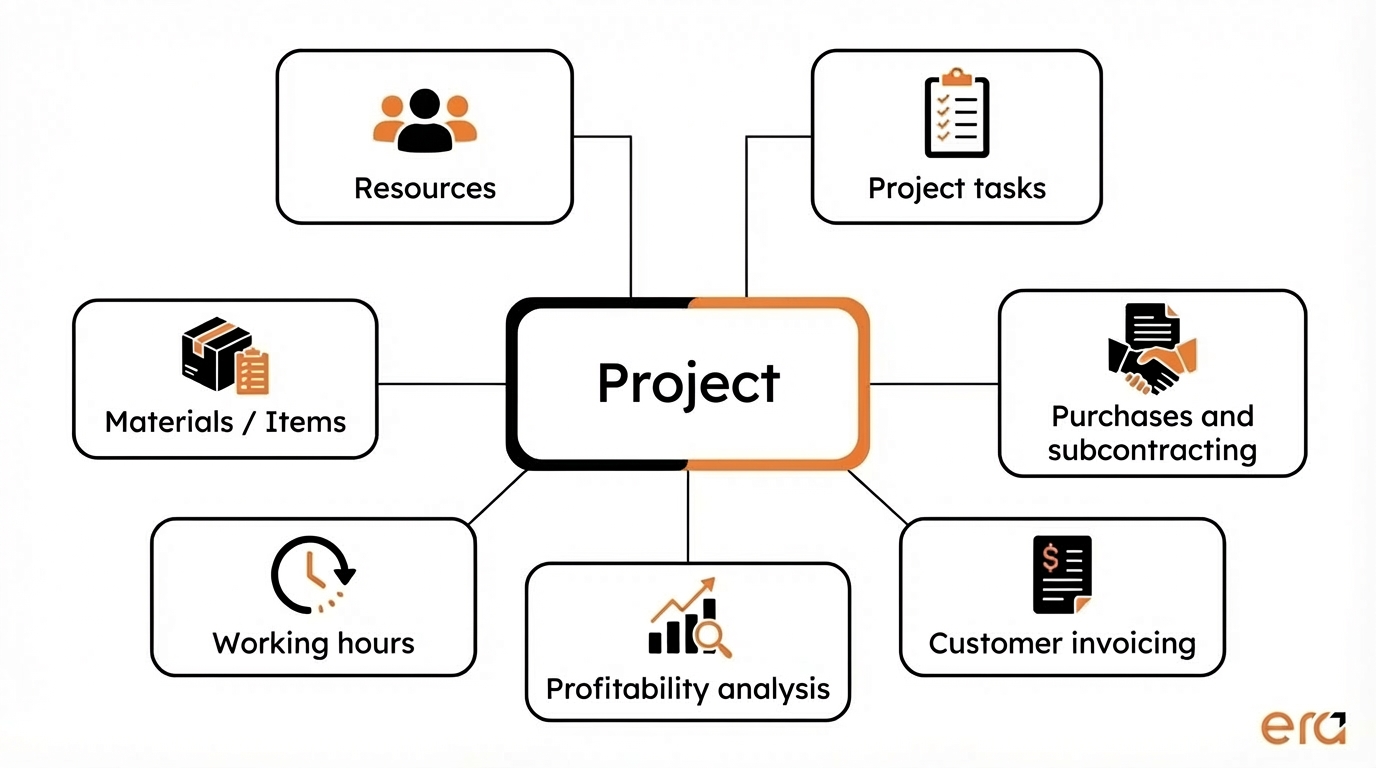
In Microsoft Dynamics 365 Business Central, project management is built around what is now called the Projects module (formerly known as Jobs). The idea is fairly straightforward. Each project becomes a structured entity in the ERP where tasks, resources, budgets, and actual costs are all brought together.
In other words, a project is no longer just a shared folder or a spreadsheet floating between teams. It becomes a financial and operational object inside the system.
Take a common manufacturing example. A company is designing and delivering a custom machine for a client. This project may involve multiple phases: engineering, sourcing specific components, assembly, testing, and installation. In Business Central, all of these activities can be organized within a single project.
A project in Business Central can typically include:
- project tasks to structure each phase of the work
- cost and revenue budgets
- resources such as employees or equipment
- materials or items required for production
- actual time entries and project-related expenses
And this is where things start to matter for finance teams.
Every transaction recorded in the ERP can be linked back to the project. A vendor invoice can be tied to a specific task. Employee time can be assigned directly to the project. Materials consumed during production can be captured as project costs.
Over time, the project becomes a living view of financial and operational activity. Actual costs accumulate as work progresses, while budgets remain visible for comparison.
For a CFO, this changes the dynamic. Project profitability is no longer something you discover at the end. It becomes something you can monitor as the project unfolds.
And in a manufacturing environment where projects can span weeks or months, that kind of visibility makes a real difference.
Now that the structure is clear, let’s look at the specific features that support project and cost management in Business Central.
Key Project and Cost Management Features in Business Central
Once a project is created in Business Central, several features come into play to structure the work and track financial performance. This is not a traditional task management tool. What makes it different is how operations and finance are connected within the same system.
For a CFO, that connection is where the real value shows up. Every project activity can be tied to financial data, making it easier to understand how costs evolve over time.
Let’s look at a few key components.
Project Planning with Tasks and Planning Lines
Everything starts with how the project is structured. In Business Central, projects are typically broken down into project tasks, which represent the different phases of the work. Design, assembly, testing, installation, each step can be defined and tracked separately.
Then come the planning lines, which define what is required to complete each task.
These can include:
- engineering hours
- required materials
- internal resources
- project-related purchases or external services
Each line carries a planned cost, and in some cases, a sales price. From the start, the project already has a financial framework.
This planning acts as a baseline. It will not perfectly predict reality, but it gives teams a clear reference point to measure deviations.
Cost Tracking as Transactions Are Recorded
This is one of the most valuable aspects for finance teams.
In Business Central, day-to-day transactions can be linked directly to a project. As data is entered and posted in the ERP, actual costs begin to build against the project.
Typical examples include:
- vendor invoices related to project purchases
- employee time entries
- materials consumed in production
- subcontracted services recorded as project-related purchases
Each transaction contributes to the project’s actual cost. This makes it possible to compare planned versus actual costs continuously as the project progresses.
For a CFO, this changes the timing of decisions. Instead of analyzing profitability after the project is completed, it becomes possible to identify cost overruns early and react sooner.
Resource and Capacity Management
Projects often rely on multiple types of resources. Employees, of course, but also equipment, specialized roles, or external contributors.
Business Central allows teams to assign resources to specific project tasks and track how time is allocated. This helps teams understand who is working on what and when.
It also helps prevent common issues, such as overbooking critical resources or delaying a project because key skills are already committed elsewhere.
While it may not replace advanced planning tools, for many manufacturing companies, this level of visibility is more than sufficient.
Project-Based and Milestone Billing
Billing is another key part of project management, especially in manufacturing environments.
Projects are rarely invoiced all at once. Billing may happen at different stages: an upfront deposit, a milestone after design, and a final invoice upon delivery.
Business Central supports these scenarios directly within the project.
Companies can invoice:
- based on project progress
- based on predefined milestones
- based on actual costs incurred
This means revenue can be aligned more closely with the actual progress of the project.
For finance teams, this improves cash flow visibility and makes it easier to track margins at each stage.
Now that these features are in place, the next question is simple.
How do they all come together in a real project?
Let’s walk through what a typical project lifecycle looks like in Business Central.
What Does a Project Lifecycle Look Like in Business Central?
Features are one thing. But how does a project actually unfold in Microsoft Dynamics 365 Business Central?
In practice, the lifecycle is quite intuitive. It closely reflects how teams already operate, with one key difference: everything is centralized inside the ERP.
Let’s walk through the main stages.
1. Project Creation
It starts with creating a project in Business Central.
At this stage, key information is defined, such as the customer, project description, currency, and sometimes dimensions like department or product line.
The project acts as a container that will bring together all activities, costs, and revenues.
In manufacturing, this could represent a custom machine build, a client installation, or an internal engineering project.
2. Planning and Budgeting
Next comes planning.
Teams define project tasks and add planning lines that represent the required resources and inputs. This can include:
- engineering hours
- required materials
- external purchases
- subcontracted services
Each element is assigned a planned cost, and sometimes a sales price.
This becomes the project’s financial baseline. It is not a perfect forecast, but it provides a structured estimate to compare against as the project progresses.
3. Execution and Activity Tracking
Once the project is underway, transactions begin to appear in the ERP.
Employees log time, purchases are recorded, and materials are consumed in production. Each of these can be linked to the project.
As this happens, actual costs accumulate.
This is where visibility becomes critical. Project managers and finance teams can compare what is happening in real operations against what was originally planned.
If costs begin to exceed expectations, the gap becomes visible early.
4. Customer Invoicing
Depending on the nature of the project, billing can take different forms.
Some companies invoice at specific milestones. Others bill based on actual costs incurred. Business Central supports both approaches directly within the project.
Revenue is tied to the same project as the costs.
That connection makes financial tracking significantly easier.
5. Profitability Analysis
As the project progresses or once it is completed, teams can analyze performance.
Reports allow companies to compare:
- planned vs actual costs
- revenue generated by the project
- overall project margin
For a CFO, this insight is essential. It helps identify which types of projects are truly profitable, which customers generate better margins, and where cost overruns tend to happen.
At this point, something becomes clear.
Managing projects inside the ERP is not just about organizing work. It is about connecting operations to financial outcomes.
And that is exactly what we will explore in the next section.
Why Manufacturers Manage Projects Directly in the ERP
For a long time, project management and financial management lived in separate worlds. Operations teams worked in planning tools, while finance teams tried to piece together project costs from accounting data.
The result? Gaps in visibility.
A project might look like it is progressing well from an operational standpoint. Tasks are moving forward, milestones are being reached. But financially, the picture can be very different. Costs may be rising faster than expected, unplanned purchases start appearing, or engineering hours exceed initial estimates.
This is exactly why many manufacturers choose to manage projects directly in their ERP, such as Microsoft Dynamics 365 Business Central.
When projects are managed inside the ERP, operational and financial data come together in one place. Costs, resources, and revenues are all tied to the same project, making financial tracking much more straightforward.
For finance teams, the impact is immediate. Project profitability is no longer something discovered at the end. It is built and monitored as the project progresses.
Another key advantage is traceability. When all transactions are captured within the same system, it becomes much easier to understand budget variances. Why did a project go over budget? Which phase consumed the most resources? Which types of projects generate the strongest margins?
These are questions that can take significant effort to answer in a fragmented environment. Within an ERP, the answers are much easier to access.
Of course, this approach does not change everything overnight. Processes need to be structured, teams need to adopt consistent practices, and the ERP must be configured properly.
But once in place, the shift is clear. Projects are no longer just operational activities. They become measurable financial objects.
And at that point, many companies recognize a broader issue they have been dealing with for years. Before using an ERP like Business Central, project management often relied on a combination of tools that were not always well connected.
The Challenges Companies Face Before Adopting Business Central
Before integrating project management into an ERP, many manufacturing companies operate with a mix of tools. A few spreadsheets for tracking budgets, a task management tool for operations, and an accounting system trying to consolidate everything at the end of the month.
On paper, it can seem manageable.
In reality, it is often more complex.
Take a common scenario. The engineering team tracks hours in a shared file. Project-related purchases are recorded in the accounting system, but without a direct link to project tasks. Meanwhile, the finance team tries to reconstruct overall project profitability using multiple data sources.
The result is limited visibility.
- Simple questions become difficult to answer:
- What is the current cost of the project right now?
- How many hours have been spent on the design phase?
- Which purchases were made specifically for this project?
- Is the expected margin still realistic?
Answers often come late, sometimes after the project is already delivered.
Another common challenge is managing budget variances. Without a centralized system, cost overruns only become visible when invoices are posted or time is consolidated. By then, it is often too late to adjust decisions.
There is also the issue of coordination across teams. Operations, engineering, production, and finance each work with their own view of the project. Data circulates, but not always smoothly.
This lack of alignment creates friction. Nothing dramatic, but enough to slow down analysis and complicate decision-making.
This is exactly the type of situation that ERP systems like Microsoft Dynamics 365 Business Central are designed to simplify. By connecting operational activities with financial data, companies gain a much more consistent view of their projects.
But in some cases, companies want to go even further. Automate certain steps, build more advanced dashboards, or connect project data with other systems.
That is where the broader Business Central ecosystem comes into play.
When to Extend Project Management with Power Platform
For many manufacturing companies, the project management capabilities built into Microsoft Dynamics 365 Business Central already cover a large part of their needs. Planning, cost tracking, billing, and profitability analysis are all handled within the ERP.
But over time, new needs tend to emerge.
Companies start asking questions like: Can certain administrative steps be automated? Can we get more visual dashboards to track project performance? Can project data be connected to other tools used across the organization?
This is typically where companies begin to explore the Microsoft Power Platform.
For example, Power Automate can be used to build automations around project processes in Business Central. A company might set up a workflow that triggers a notification when a project exceeds a specific budget threshold. Another scenario could involve approval workflows for purchases above a certain amount.
These types of scenarios are usually implemented as custom automations, extending what Business Central already provides.
On the analytics side, Power BI can turn project data into interactive dashboards. Leaders can quickly visualize key indicators such as:
- project margin
- cost evolution over time
- performance across different project types
- resource contribution to financial outcomes
These tools do not replace Business Central. They extend it by adding additional layers of automation and visibility.
Of course, not every company needs these capabilities from day one. Many start with the standard features in Business Central. As processes become more structured, they identify opportunities to enhance them.
This is where a modern ERP becomes particularly valuable. It does more than record transactions. It becomes a foundation for building smarter processes around business data.
In the end, project management in Business Central is not just about tracking tasks or budgets. It is about connecting day-to-day operations with financial decision-making.
And for manufacturers managing multiple projects at once, that connection can make a meaningful difference.

Is Your Business Ready for an ERP Project?
Before launching an ERP initiative, several factors need to be assessed. This checklist helps you determine whether your business is ready for a successful implementation.
Download the ERP readiness checklistConclusion
In many manufacturing companies, projects represent a significant part of day-to-day operations. Whether it is developing a new product, building custom equipment, or managing a client installation, each project involves time, resources, and financial investment.
The challenge is not only to organize the work. It is also to understand how much these projects truly cost and what margins they generate.
This is exactly what Microsoft Dynamics 365 Business Central enables by bringing project management directly into the ERP. Through the Projects module, companies can plan activities, track costs as transactions are recorded, and analyze profitability without relying on disconnected tools or spreadsheets.
With better visibility, finance teams can act earlier when cost deviations appear. Project managers, in turn, gain access to more reliable data to support decisions during project execution.
In short, project management is no longer just a retrospective exercise. It becomes an ongoing way to monitor performance and guide decisions.

Improve Your Project and Cost Management in Business Central
Looking to gain better visibility into project costs, resources, and profitability in Microsoft Dynamics 365 Business Central? Our experts help manufacturing companies structure their processes and optimize their ERP environment to support better financial control and project visibility.
Schedule a consultationFAQ
What is project management in Dynamics 365 Business Central?
Project management in Microsoft Dynamics 365 Business Central is handled through the Projects module. It allows companies to plan tasks, track costs, manage resources, and analyze project profitability within the ERP.
How does Business Central track project costs?
Business Central links transactions to projects. Employee time, purchases, materials, and services can all be associated with a project, allowing teams to compare actual costs with planned budgets.
Can you manage project resources in Business Central?
Yes. Business Central allows companies to assign employees and equipment to project tasks and track the time spent on each activity.
Can you invoice customers directly from a project in Business Central?
Yes. Companies can generate invoices directly from projects based on progress, milestones, or actual costs incurred.
Is Business Central suitable for manufacturing project management?
Yes. Manufacturing companies use Business Central to manage projects such as custom builds, installations, and engineering work while tracking costs and profitability.
Oussama Nait-Zlay
Content Marketing Manager
Oussama is a technology content expert at Era Consulting Group. He focuses on making complex topics related to ERP and enterprise technologies accessible, helping organizations fully leverage digital innovations. He brings several years of experience in the SaaS and technology industries, notably with companies such as Zoho and ManageEngine.
Follow Oussama Nait-Zlay